Multiband bass pedal firmware for Daisy Seed pedals

Split your bass in two.

Bandwerk turns a DIY Daisy Seed pedal into a multiband bass processor. It runs on the Cleveland Music Co. Hothouse and the GuitarML FunBox. A crossover splits your signal in two: keep the lows clean, tight and solid, and compress, loop, octave and drive the highs. Open source, free, installed from your browser.

Beta Version 0.2. Feedback is very welcome.

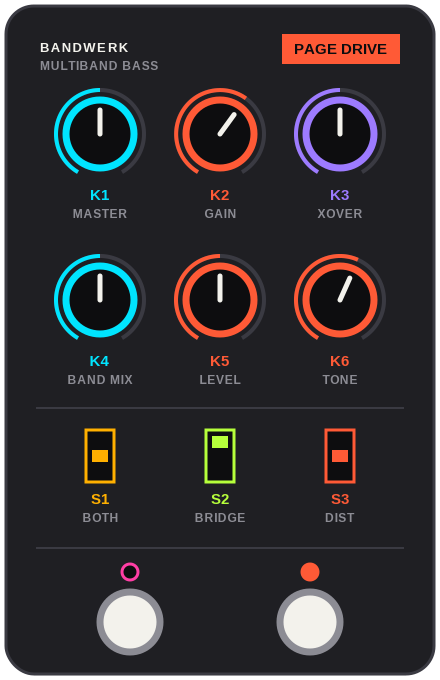
Illustration of the pedal running Bandwerk on its DRIVE page: six knobs with colored rings, three toggle switches, two LEDs and two footswitches.

Play with the chain.

Click any block to see what it does and change it. Without a pedal the studio runs a demo. Connect your pedal by USB to see its live levels and control every parameter from the browser.

Signal lab

Loading the interactive studio…

Every effect, explained.

Every effect has a copy of the pedal locked to its page, live graphs computed from the firmware’s own formulas, and a Hear it button that sets the effect up on the demo loop. Turn the knobs and watch the graphs move.

Effect 01 · K3 · every page

Crossover.

The crossover splits your bass at one frequency: everything below goes to the clean low band, everything above to the high band, and the two always add back up flat.

How it works

A Linkwitz-Riley crossover of the 4th order: each band is two Butterworth filters in series, 24 dB per octave. At the crossover point both bands are 6 dB down and exactly in phase, so when they are added back together the level is the same at every frequency. With all effects neutral the pedal sounds like your bass.

K3 is logarithmic and glides smoothly, without zipper noise. Anything that delays one band (the drive’s oversampling, the FX loop) delays the other band by exactly the same amount, so the sum stays flat.

Starting points

  • About 170 Hz (K3 at 10 o’clock). Only the fundamentals of the lower strings stay clean. Tight, modern drive tones.
  • 500–800 Hz. Almost all of your tone stays clean; drive and octave up only add an edge on top. Subtle grit for fingerstyle.
All ranges

Controls

ControlParameterRangeDefault
K3Crossover frequency100 … 800 Hz, log, 12 o’clock = 250 Hz250 Hz

K3 is live on every page. At power-up it starts at its saved value: turn it until LED 1 stops blinking, then it follows the knob.

Effect 02 · Page COMP · move S1

Compressors.

Two compressors, one per band, always in the signal path: the low one holds your fundamental at a steady level, the high one evens out pick and slap attack and feeds the drive a steady signal.

How it works

A feed-forward design. A peak detector measures the level in dB; it holds each peak briefly (25 ms low, 5 ms high), so the long waveforms of low notes don’t make the gain wobble within every cycle. Above the threshold the level is reduced by the ratio, with a 6 dB soft knee. Attack is fixed (10 ms low, 5 ms high), release is on K5.

Auto makeup gain brings the compressed signal back up: threshold × (1 − 1/ratio) × 0.6, so it gives back 60 % of what a full-scale note loses. Dry/wet then blends the compressed signal with the untouched one, parallel compression that keeps your transients.

S1 chooses what the knobs edit: up = HIGH band, middle = both, down = LOW band. With both selected, one knob moves both bands to the same knob position, each within its own range.

Starting points

  • Even fingerstyle. LOW band, threshold (K6) around 10 o’clock (about −30 dB): low notes stop jumping out.
  • More click and attack. HIGH band, dry/wet (K4) at about 10 o’clock: the compressed signal fills in under untouched transients.
  • Compression off. Turn a band’s dry/wet (K4) fully left.
All ranges

Controls

ControlParameterRange low / highDefault low / high
K6Threshold−40 … −6 dB (both)−24 dB / −18 dB
K2Ratio4:1 … 20:1 / 1.5:1 … 8:1, log8:1 / 3:1
K5Release50 … 400 ms / 30 … 250 ms, log150 ms / 80 ms
K4Dry/wet0 … 100 %100 % / 60 %
–Attackfixed10 ms / 5 ms
S1Band to editup HIGH · middle both · down LOW–

Effect 03 · Page LOOP · move S2

FX loop.

Put any effect pedal on the high band only; the low band stays clean and solid, and the pedal measures the round trip through your effect and delays the low band by the same time so both bands meet again in phase.

How it works

The high band leaves the pedal on the send right after its compressor. What comes back on the return is blended with a dry copy of the high band (K4: fully left = dry only, fully right = return only, a plain serial loop). The octave up and the drive come after the loop.

Why alignment matters. Digital pedals delay the signal, often by one to a few milliseconds. If the high band comes back late and the low band doesn’t, the two bands no longer add up around the crossover point, and a dry/wet blend turns into a comb filter that sounds hollow and thin (see the graph). So the low band and the dry part of the blend are delayed by exactly the loop latency, to a fraction of a sample.

Automatic measurement. At power-up (one second after start, if S2 isn’t on Bridge) and every time you move S2 from Bridge to a loop mode, the pedal sends a short burst of noise (−20 dBFS, about 43 ms) to the send and finds it in the return by cross-correlation. This takes about a tenth of a second: meanwhile the high band plays dry, your output never goes silent, and the noise is not mixed into your output. The result is saved. If nothing comes back (effect off or still booting, a noise gate), the last good value stays, LED 1 blinks fast for 1.5 s, and the pedal tries again every 2 s, up to 15 times. A delay or reverb in the loop repeats the measurement noise audibly.

Try it here: with Hear it running, switch the virtual loop pedal from Overdrive to Chorus. The chorus has a higher latency, so the bands fall out of alignment and the response in the graph turns into a comb (hollow, thin high band). Then flip S2 to Bridge and back: the pedal measures again and the comb is gone.

Starting points

  • Serial (K4 fully right) for most pedals. Blend (K4 around 12 o’clock) for drives and fuzzes when you want to keep some clean high band.
  • Changed a preset or swapped pedals? Flip S2 to Bridge and back: the pedal measures again.
All ranges

Modes (S2)

S2ModeWhat happens
UpBridgeLoop off: the send is silent, the return is ignored, no extra delay. Use this with plain TS cables.
MiddleLoopSend and return active, blend and latency compensation on.
DownLoop, phase invertedLike Loop, but the return is inverted, for effects that flip the polarity.

Controls

ControlParameterRangeDefault
K2Send level−12 … +12 dB, 12 o’clock = 0 dB0 dB
K5Return level−12 … +12 dB, 12 o’clock = 0 dB0 dB
K4Loop mix0 … 100 % return, linear crossfade100 % (serial)
K6Delay trim−1 … +1 ms around the measured latency, small dead band at 12 o’clock0 ms
S2ModeBridge · Loop · Loop phase-inverted–

The loop needs two TRS insert cables: see Cables & wiring.

Effect 04 · Page OCTAVE · FS1

Octaver.

One octave down for synth-like weight and one octave up for a bright, ringing edge, built like the classic analog octavers: the sub joins the low band, the octave up joins the high band right before the drive.

How it works

A detector listens to your full signal before the crossover (you never hear it). It evens out the level, filters away everything above about 300 Hz so only the fundamental remains, and watches for zero crossings, with hysteresis so noise can’t trigger it twice.

−1 octave. A flip-flop changes state at every rising zero crossing, which makes a square wave at exactly half your note’s frequency. The sub tone filter (K6) rounds it off from buzzy to round, and it follows the volume of your playing.

+1 octave. Full-wave rectifying the signal (folding its negative half up) doubles its frequency. The signal is band-limited before (800 Hz) and shaped after (90 Hz to 3 kHz), then levelled to match.

A gate switches both octaves off below about −50 dBFS, so the sub doesn’t chatter on noise between notes. FS1 switches the octaver on and off with a short ramp, no clicks.

Tracking limits. Monophonic, like every analog octaver: play single notes. Chords and double stops confuse the −1 (the +1 copes better, it is a pure rectifier). The sub needs a clear fundamental: very soft or dead notes and harmonic-heavy playing (slap, right at the bridge) can make it warble or drop out. Play cleanly with your fingers, nearer the neck than the bridge, for the steadiest sub.

Starting points

  • Octave fuzz. +1 at 2 o’clock, −1 fully left, drive on in FUZZ: the octave up goes straight into the fuzz.
  • Dry/wet. At 12 o’clock the direct signal and the octaves both play at full level; fully left = direct only, fully right = octaves only.
All ranges

Controls

ControlParameterRangeDefault
K2Level −10 … 200 %, 12 o’clock = 100 %100 %
K5Level +10 … 200 %, 12 o’clock = 100 %100 %
K4Dry/wetDual taper: left fades the octaves, right fades the direct signal12 o’clock: both 100 %
K6Sub tone80 … 500 Hz, log200 Hz
FS1Octaver on/offTap: on/off (on opens the page). Hold: open the pageOff

Effect 05 · Page DRIVE · FS2 · S3

Drive.

Three flavours of dirt, overdrive, distortion and fuzz, on the high band only, so your low end stays clean underneath and you can go much further than with a full-range drive.

Beta The voicing (gain ranges, loudness match) is provisional in v0.1 and will be tuned by ear.

How it works

Gain (K2) pushes the high band into a clipping curve; S3 picks the curve. Overdrive (up) is a soft tanh curve with a slight asymmetry for warm even harmonics. Distortion (middle) stays clean longer, then flattens firmly. Fuzz (down) clips hard and off-centre for a spitty, ragged edge. A level match keeps the volume about the same when you switch the drive on; Tone (K6) is a tilt EQ around 800 Hz after the clipping.

Oversampling, in plain words. Clipping creates new overtones, some of them higher than 48 kHz audio can hold. Without precautions they fold back down as inharmonic, metallic noise (aliasing). So the drive works at 2× (overdrive) or 4× (distortion, fuzz) the sample rate internally and filters before it comes back down. It always delays by the same 18 samples (0.375 ms), on or off, and the low band is delayed to match.

Fuzz split. In fuzz mode, with the drive on, a second crossover at half the crossover frequency takes the upper part of the low band (with K3 at 250 Hz: 125 to 250 Hz) and feeds it into the fuzz too. The fuzz gets more body; the deepest lows stay clean.

Starting points

  • Modern growl. DIST, gain at 1 o’clock, tone a bit right, K3 at 10 o’clock (about 170 Hz).
  • Just some hair. OD, gain at 9 o’clock, band mix (K4) at 12.
All ranges

Controls

ControlParameterRangeDefault
K2GainOD 0 … 24 dB · DIST 12 … 42 dB · FUZZ 24 … 54 dB12 o’clock (12 / 27 / 39 dB)
K5Level−∞ … +6 dB, 12 o’clock ≈ as loud as drive off12 o’clock
K6ToneTilt ±6 dB at 800 Hz, left darker, right brighterFlat
S3Typeup OD · middle DIST · down FUZZ–
FS2Drive on/offTap: on/off (on opens the page). Hold: open the pageOff

Effect 06 · K1 every page · K4 on page DRIVE

Mix & master.

At the end both bands come back together: the band mix leans the balance towards the clean lows or the processed highs, the master sets the output level, and a soft clipper keeps the pedal from clipping harshly.

How it works

Band mix (K4 on page DRIVE, active whether the drive is on or off): at 12 o’clock both bands play at 0 dB. Turning left fades the high band out while the low band stays at 0 dB; turning right fades the low band out. Halfway to either end the fading band is about 12 dB down.

Master (K1, every page) is always live and follows the knob from the moment the pedal starts. Soft clip: up to about −3 dBFS the output is untouched; above that a smooth curve rounds off the peaks instead of hard digital clipping.

Bypass. Tap both footswitches together. Your bass goes straight to the output, untouched by any processing, with a 10 ms crossfade. Everything keeps running in the background, so switching back on doesn’t pump or click. The FX send is muted while bypassed, so pedals in the loop get no signal. Both LEDs are off in bypass.

Starting points

  • Match your bypass level. Set the master so the pedal is as loud on as off; the soft clipper is a safety net, not a sound.
  • Recording direct. Keep the master at or below 12 o’clock and your peaks under the soft-clip point.
All ranges

Controls

ControlParameterRangeDefault
K1Master−∞ … +6 dB, 12 o’clock = 0 dBfollows the knob
K4Band mix (page DRIVE)low only … both at 0 dB … high only12 o’clock
FS1 + FS2Bypasstap both togetherOff at power-up

Pedal guide.

Six knobs, three toggle switches, two footswitches, two LEDs, no screen. The effect sections above show what each knob does on each page; this is the rest.

Pages

K1 (master) and K3 (crossover) do the same thing on every page and are always live. K2, K4, K5 and K6 change their job with the page: COMP, LOOP, OCTAVE or DRIVE. Moving S1 opens COMP, S2 opens LOOP, S3 opens DRIVE; FS1 and FS2 open OCTAVE and DRIVE (below). The pedal starts on the DRIVE page.

The page changes the moment you move a switch; the sound only changes once the switch has stayed in its new position for 300 ms. A quick flick there and back just opens the page. At power-up the switch positions apply immediately.

Footswitches

PressFS1 (left)FS2 (right)
TapOctaver on/off; on opens page OCTAVEDrive on/off; on opens page DRIVE
Hold ≥ 0.5 sOpen page OCTAVEOpen page DRIVE
Both, tappedBypass on/off (press together, release within 0.8 s)
Both, held 2 sUpdate mode: the LEDs alternate 3 times and the pedal waits for the installer until you power-cycle it

Switching an effect off leaves the page as it is. During a two-switch gesture the single-switch functions never fire.

Knob pickup

When you change page, K2, K4, K5 and K6 keep their stored values; nothing jumps to wherever the knob happens to point. Turn a knob and LED 1 blinks: slowly while the knob is far from the stored value, faster (up to about 10 times a second) as you get closer. As soon as you reach or pass the stored value the knob takes over, and LED 1 stays lit while you turn it.

K3 works the same way once after power-up, because the crossover starts at its saved value. On the COMP page with both bands selected, the pickup point is the average of the two bands.

What is saved, and when

Every page parameter, the crossover, octaver and drive on/off, and the measured loop latency are saved to the pedal’s flash memory automatically, 3 seconds after your last change (and only if something changed). The writes are spread over the memory, good for millions of saves.

Not saved: the master (it always follows K1), bypass (the pedal always starts active), the page (always DRIVE at power-up) and the toggle switches (they are physical). There is no reset gesture on the pedal, so it can’t happen by accident.

LED language

SituationLED 1 above FS1 · octaverLED 2 above FS2 · drive
Effect onOnOn
Effect off, pedal activeBreathes slowly, dimBreathes slowly, dim
BypassOffOff
A page openedBlinks twice: COMP both together, LOOP both alternating, OCTAVE LED 1 only, DRIVE LED 2 only
Knob not picked up yetBlinks 1 to 10 times a second, faster when closer; on while you turn a picked-up knob (until 1 s after you stop)Normal
Loop measurement failedFast blink for 1.5 sNormal
Power-upBoth blink 3 times
Entering update modeBlink 3 times, alternating

Priority: bypass, then knob pickup (LED 1 only), then page blinks, then the effect state.

Power-up

  1. 0 sBootloader window. For 2 seconds the pedal waits for an installer; this is what makes a failed update always recoverable. No sound yet.
  2. ≈ 2 sThe effect starts. Both LEDs blink 3 times, the saved settings are loaded, the DRIVE page is open and the master follows K1.
  3. + 1 sLoop check. If S2 is on a loop mode, the pedal measures the loop latency (about 0.1 s, your sound keeps playing).
  4. Any timePick up K3. If you want a different crossover, turn K3 until LED 1 stops blinking.

Cables & wiring.

IN and OUT are stereo (TRS) jacks used as two mono channels: the tips carry your bass and the pedal output, the rings carry the FX return and send.

Without the FX loop

Normal use: a mono TS cable from the bass to IN, and one from OUT to the amp. S2 on Bridge. BASS PEDALS2 up: Bridge AMP TS → IN OUT → TS
Two normal mono (TS) cables. A TS plug connects the ring to ground, which is fine as long as S2 is on Bridge.

With the FX loop

FX loop wiring with two TRS insert cables. IN jack: tip from the bass, ring from the effect's output (return). OUT jack: tip to the amp, ring to the effect's input (send). BASS PEDAL INOUT AMP YOUREFFECT tip: bass ring:return tip: output ring:send
Two TRS insert cables (one TRS plug to two TS plugs), one on IN and one on OUT.
JackTipRing
INBass inputFX return (from your effect’s output)
OUTPedal output (to the amp)FX send (to your effect’s input)

Insert cable labels differ between brands (“send”, “return”, colored rings): go by tip and ring, not by the label.

Using plain TS cables?

Keep S2 on Bridge (up). A TS plug grounds the ring, so in a loop mode the return is silent: the high band disappears (at full loop mix) and the latency measurement fails, LED 1 blinks fast.

Hardware.

Bandwerk runs on two DIY pedals built around the Daisy Seed. Choose yours in the installer.

Cleveland Music Co. Hothouse

Tested

The reference platform. Everything on this page was developed and measured on it.

GuitarML FunBox v1–v3

Supported, not yet tested on FunBox hardware

Same knobs, footswitches and LEDs. On the FunBox the toggles read left / middle / right (left = up, right = down) where this page says up / middle / down. Reports are welcome on GitHub.

What you need

A Daisy Seed in the pedal, a USB data cable to reach the Daisy Seed for the web features (installer, Studio), and a TRS insert cable for the FX loop.

Bandwerk is an independent open-source project, not affiliated with Cleveland Music Co. or GuitarML; Hothouse and FunBox are their respective owners’ names.

Install in your browser.

No toolchain, no command line. Pick your pedal (Hothouse or FunBox) first; the installer then writes the firmware over USB right from this page. The first install also adds the Daisy bootloader; later updates only replace the firmware and your settings stay.

  1. Connect USB

    Connect the USB port of the Daisy Seed in your pedal to your computer with a USB data cable (some cables only charge).

  2. Update mode

    Already on Bandwerk: the installer does it for you over USB. First install: hold both footswitches for 2 seconds in your current pedal firmware, or press BOOT + RESET on the Daisy Seed.

  3. Click Install

    Choose the pedal when the browser asks. On a first install it asks twice, because the pedal restarts in between. Then wait until the installer says it’s done.

Installer

Loading the installer…

Browser support

BrowserInstaller WebUSBStudio link Web Serial
Chrome, Edge, Opera (desktop)YesYes
Chrome (Android)YesYes
Firefox (desktop)NoVersion 151 and newer
Safari, any iOS browserNoNo

The studio’s demo mode works in every modern browser.

Windows

If the browser can’t open the pedal in update mode, Windows has no suitable driver for it yet. Install the WinUSB driver once with Zadig: put the pedal in update mode, choose it in the list (a DFU device with the USB ID 0483:DF11), select WinUSB and click Install.

Linux

Your user needs access to the USB device 0483:DF11, usually through a udev rule.

Fallback

If the installer doesn’t work for you, download the bootloader and firmware files from the GitHub releases and flash them with the Electro-Smith Daisy Web Programmer, or with dfu-util from the command line (see Developers).

For developers.

Plain C++ on libDaisy. The DSP and UI logic are hardware-free and unit-tested on your computer. Everything is GPL-3.0-or-later.

Questions.

Do I need a computer on stage?

No. Once installed, the pedal works on its own with its knobs, switches and footswitches, and it remembers your settings. The computer is only for installing, updating and, if you like, the studio.

Which browsers work?

The installer needs WebUSB: Chrome, Edge or Opera on a desktop computer, or Chrome on Android. Connecting the studio to your pedal needs Web Serial: the same browsers, plus Firefox 151 or newer on desktop. Safari and every browser on iPhone and iPad can’t talk to USB devices. The studio’s demo works everywhere.

Will an update keep my settings?

Yes. Your settings live in their own area of the pedal’s flash chip, separate from the firmware, and an update only rewrites the firmware. Should a future version ever need a new settings format, its release notes will say so, and the pedal starts from the factory settings once.

Why does the pedal wait 2 seconds before it plays?

For the first 2 seconds after power-up the Daisy bootloader waits for an installer. That window means a broken or interrupted update can always be fixed by simply power-cycling the pedal and installing again, without opening the enclosure. After it, the effect starts and both LEDs blink 3 times.

Can I brick my pedal?

Very unlikely. The 2-second bootloader window is there at every power-up. And if everything else fails, BOOT + RESET on the Daisy Seed always reaches the chip’s built-in bootloader, which can’t be overwritten.

Why is the FX loop on the high band only?

So your low end never goes through effects that could thin it out, add noise or add latency. Only the high band goes out; the pedal delays the low band to match whatever comes back.

How do I go back to another firmware?

Most Hothouse and FunBox firmwares are installed through the STM32 system bootloader into the Daisy’s internal flash. Hold BOOT and press RESET on the Daisy Seed inside the pedal (in Bandwerk, holding both footswitches opens the Daisy bootloader instead), then install the other firmware the way its author describes, for example with the Daisy Web Programmer. This replaces the Daisy bootloader too; to come back later, use the installer here like a first install.

What does “beta” mean here?

Version 0.2 is complete and tested on the bench, but two parts are still open: the FX loop has not been verified on hardware with real pedals yet, and the drive voicing (gain ranges, loudness match) is provisional. Reports are very welcome on GitHub.